

Overview
This schematic illustrates the configuration of a Routing group, which includes a Script Execution Processor to format raw strings to JSON, that routes different data types from several sources through specialized processing chains to several destinations.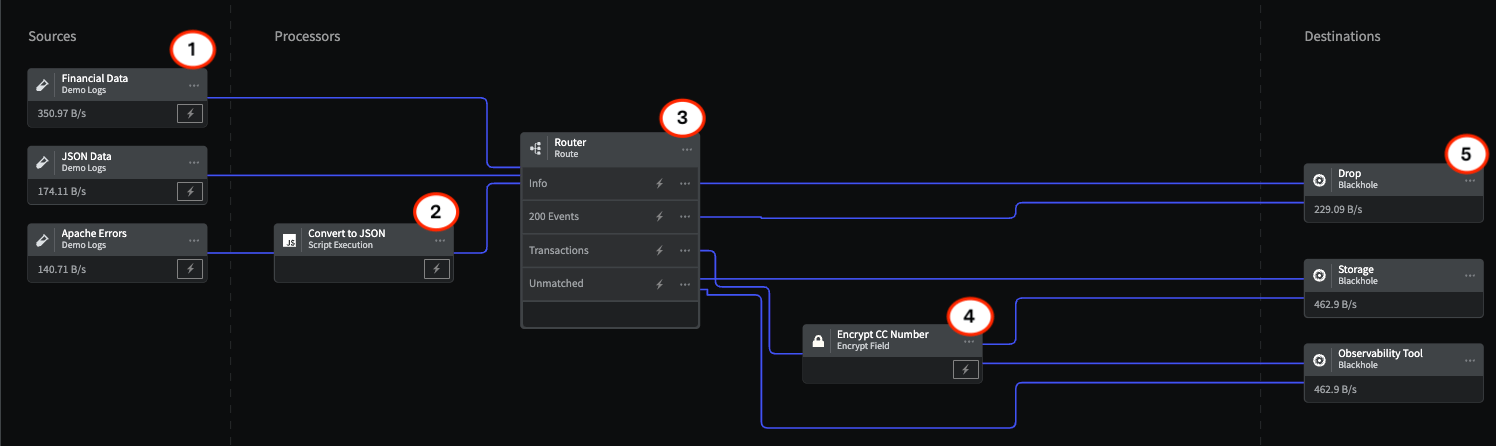
An example of using the Route Processor within a telemetry pipeline
1 - Sources
The Sources represent three different types of data flowing through the Pipeline that need to be routed to separate processing chains:- Financial Data that needs to have Personally Identifying Information encrypted before being sent to storage and the observability tool.
- JSON Data that needs to have Status - 200 events routed and dropped.
- Apache Errors that need to be converted to JSON format and all info messages dropped.
- Log into the Mezmo App, and in the Pipelines section, click New Pipeline.
- Add three Demo Logs Sources, and for Format, select 1) Financial Data 2) JSON 3) Apache Errors.
- Add three Blackhole Destinations to your Pipeline to represent 1) Drop 2) Storage 3) Observability Tool.
- Add the Processors and their configurations as shown in this example.
- To view the data transformations through the Processors, Deploy the Pipeline, and then click the Tap for the Source and each Processor to see the data as it egresses from each node.
2 - Script Execution Processor
The Script Execution Processor is configured to convert the Apache errors from raw strings to JSON format.3 - Route Processor
The Route Processor uses three conditional statements to identify and route specific components of all three data types:Apache Info Messages
Status 200 Events
Transaction Events
4 - Encrypt Processor
Because transaction events contain Personally Identifying Information (PII), such as credit card numbers, this information needs to be encrypted before being sent to storage and observability tools. For more information, check out the topic Tutorial: Mask and Encrypt Data. Encrypt Processor Configuration5 - Destinations
The routed data is sent to three destination, represented in this schematic by the Black Hole Destination:- Drop, where the unnecessary INFO and Status - 200 messages are sent.
- Storage, where all unmatched data and encrypted PII data is sent.
- Observability Tool, where all unmatched data and encrypted PII data is sent.