
Mezmo Log Management Overview
Manage Logs and Log Lines
Ingest Logs
View and Analyze Log Data
Manage Organizations and Members
Security and Compliance
Other Mezmo Resources
Title
Message
Create new category
What is the title of your new category?
Edit page index title
What is the title of the page index?
Edit category
What is the new title of your category?
Edit link
What is the new title and URL of your link?
Set Exclusion Rules
Copy Markdown
Open in ChatGPT
Open in Claude
Connect to Cursor
Connect to VS Code
Exclusion rules let you control what logs are stored. You can access Exclusion Rules by going to Usage > Exclusion Rules.
There are three parts to a rule.
You can include one or all to exclude logs.
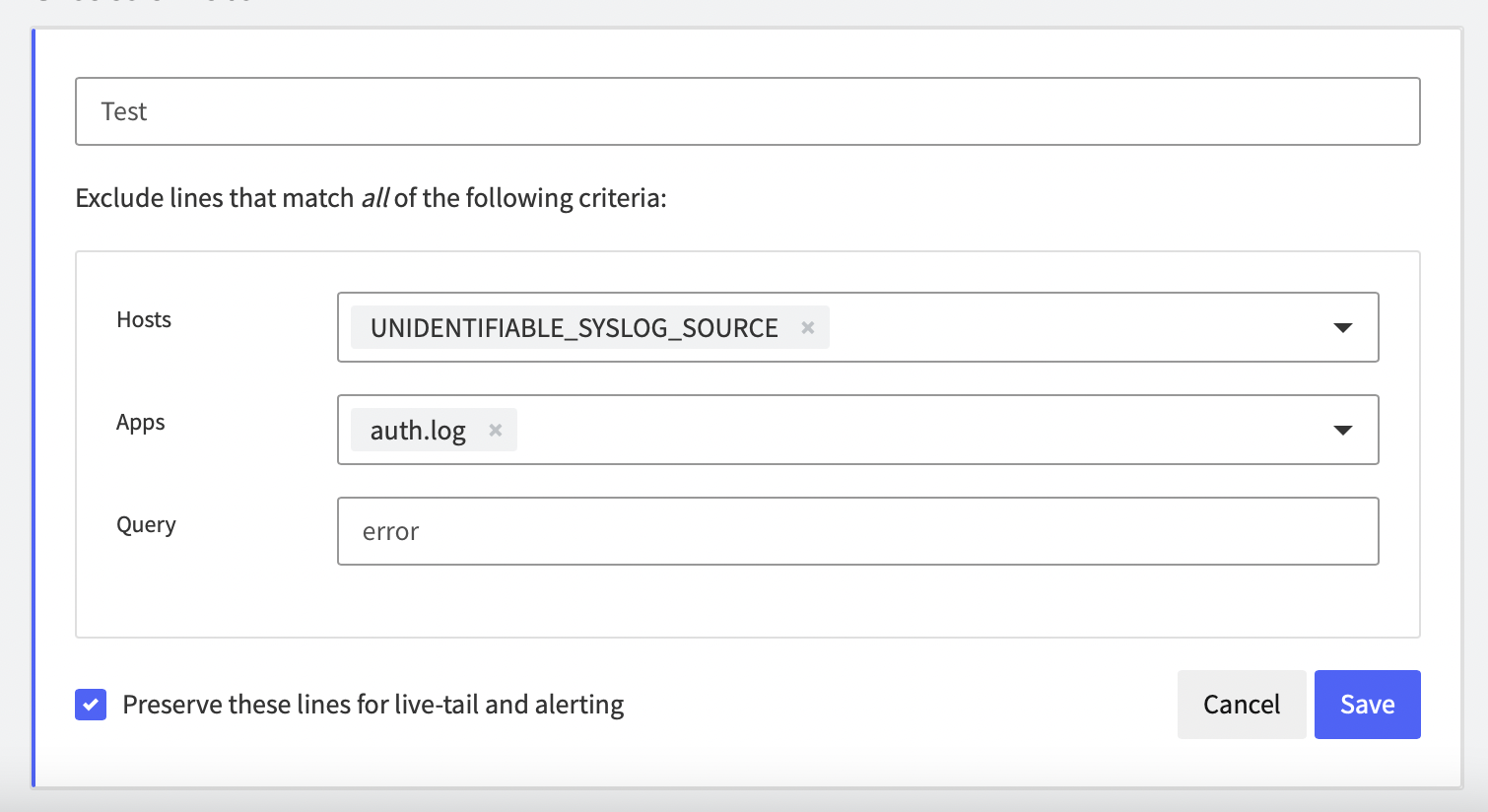
Create exclusion rules using Hosts, Apps and Query. Use one or all exclusion rules.
Type to search, ESC to discard
Last updated on
Was this page helpful?
Next to read:
Set Variable RetentionDiscard Changes
Do you want to discard your current changes and overwrite with the template?
Archive Synced Block
Message
Create new Template
What is this template's title?
Delete Template
Message