
The Situation
This Pipeline models a typical situation where you have telemetry data originating from a Kubernetes cluster and need to transform it into metric data for consumption by an observability tool, while also retaining a copy of the original data in storage for compliance and later analysis. By using a Pipeline to transform the data as it is streamed, you can reduce the volume of data sent to your tool, and at the same time ensure that data sent to the tool will be optimized to provide useful information.
If you would like to try out this Pipeline with your own Kubernetes data, this topic includes configuration information for each Processor. You can find more detailed information about Mezmo Telemetry Pipelines in our product guide. If you don't have a Mezmo account yet, sign up for a free trial so you can try out our product features and start managing your telemetry data!
Architecture Overview
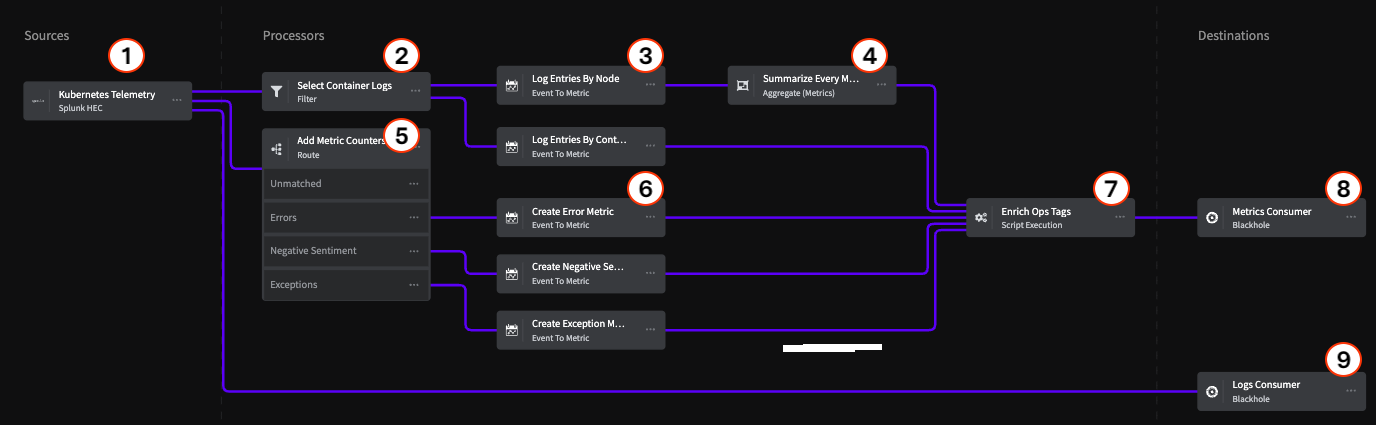
Sources
1 Splunk HEC
This Pipeline uses the Splunk HEC Source as the ingress point for Kubernetes telemetry data, but there are also a variety of Supported Telemetry Pipeline Sources, including OTel Sources, that you can use.
Processors
Container Logs Processing Chain
Nodes 2, 3, and 4 represent the chain for processing Kubernetes container logs.
2 - Filter Processor
The Filter Processor uses a conditional statement to identify telemetry data specifically related to containers within the Kubernetes cluster, and allows matching data to proceed to the next step of the Processor chain.
3 - Event to Metric Processor
The Event to Metric Processor converts the Kubernetes events into metrics representing log entries by node, and log entries by container.
Option | Setting |
|---|---|
Metric Name | l |
Kind |
|
Type |
|
Value/Value Type |
|
Value/Value |
|
Namespace/Value Type |
|
Tags/Name |
|
Tags/Value Type |
|
Tags/Field Value |
|
4 - Aggregate Metrics
The Aggregate Processor aggregates multiple metric events into a single metric event based on a defined interval window. In this case, the Processor aggregates all the metric events for the Kubernetes node logs into a single metric over a one minute interval.
Option | Setting |
|---|---|
Group by Field Paths |
|
Evaluate/Operation |
|
Window Type/Type |
|
Window Type/Interval (seconds) |
|
Event Timestamp |
|
Metric Counters Processing Chain
Processors 5 and 6 convert log message events of certain types to metrics and produces a count of each type.
5 - Route Processor
The Route Processor uses conditional statements to match log messages related to Errors, Exceptions, and Negative Sentiment (Abort, Broken, Kill, etc.) and sends them to specific Event to Metric Processors.
Option | Conditional Statement |
|---|---|
Errors Route |
|
Exceptions Route |
|
Negative Sentiment Route | `if (exists(message) AND ` (``message contains 'abort' OR message contains 'broken' OR message contains 'caught' OR message contains 'denied' OR message contains 'exception' OR message contains 'fail' OR message contains 'insufficient' OR message contains 'killed' OR message contains 'malformed' OR message contains 'outofmemory' OR message contains 'panic' OR message contains 'timeout' OR message contains 'undefined' OR message contains 'unsuccessful' OR message contains 'unavailable'))```` |
6 - Event to Metrics Processors
Each of these processors is used to count the type of message event sent to it, and produce an incremental metric for that type.
Error Metrics
Option | Setting |
|---|---|
Metric Name |
|
Kind |
|
Type |
|
Value/Value Type |
|
Value/Value |
|
Namespace/Value Type |
|
Tags/Name |
|
Tags/Value Type |
|
Tags/Field Value |
|
Negative Sentiment Metrics
Option | Setting |
|---|---|
Metric Name |
|
Kind |
|
Type |
|
Value/Value Type |
|
Value/Value |
|
Namespace/Value Type |
|
Tags/Name |
|
Tags/Value Type |
|
Tags/Field Value |
|
Exceptions Metrics
Option | Setting |
|---|---|
Metric Name |
|
Kind |
|
Type |
|
Value/Value Type |
|
Value/Value |
|
Namespace/Value Type |
|
Tags/Name |
|
Tags/Value Type |
|
Tags/Field Value |
|
7 - Enrich Ops Tags
All the processed data is sent to the final Processor in the chain, the Script Execution Processor, which adds descriptive information to the data to identify where and how it was processed.
Destinations
8 & 9 - Blackhole
This example Pipeline uses the Blackhole Destination as its termination points. All data sent to a Blackhole is dropped, so when you're building a Pipeline, you can use it to make sure your data is being correctly processed before sending it to a production Destination. Our Telemetry Pipelines product guide includes a list of supported destinations.
In this example, there is a Blackhole that represents an observability tool (metrics consumer) and a storage location (logs consumer). If your telemetry data contains Personally Identifying Information (PII) that you need to redact or encrypt before sending to storage, you could add a Compliance Processor Group to the logs consumer branch.