> ## Documentation Index
> Fetch the complete documentation index at: https://docs.mezmo.com/llms.txt
> Use this file to discover all available pages before exploring further.
# Route Data
> Use a Route Processor with conditional statements to direct financial, JSON, and Apache data from multiple sources through specialized processing chains to different destinations.
In more complex architectures, you will often have several Sources feeding into the same Pipeline, with the data for each needing different types of processing before being sent to multiple destinations. A key component of these Pipelines is a Route Processor, which uses conditional statements to match data and send it along its particular processing route.
This topic describes a typical use of a Route Processor, with examples of the Processor configurations.
## Interactive Demo
You can see how data is processed and routed through a Pipeline with this interactive demo.
\
## Overview
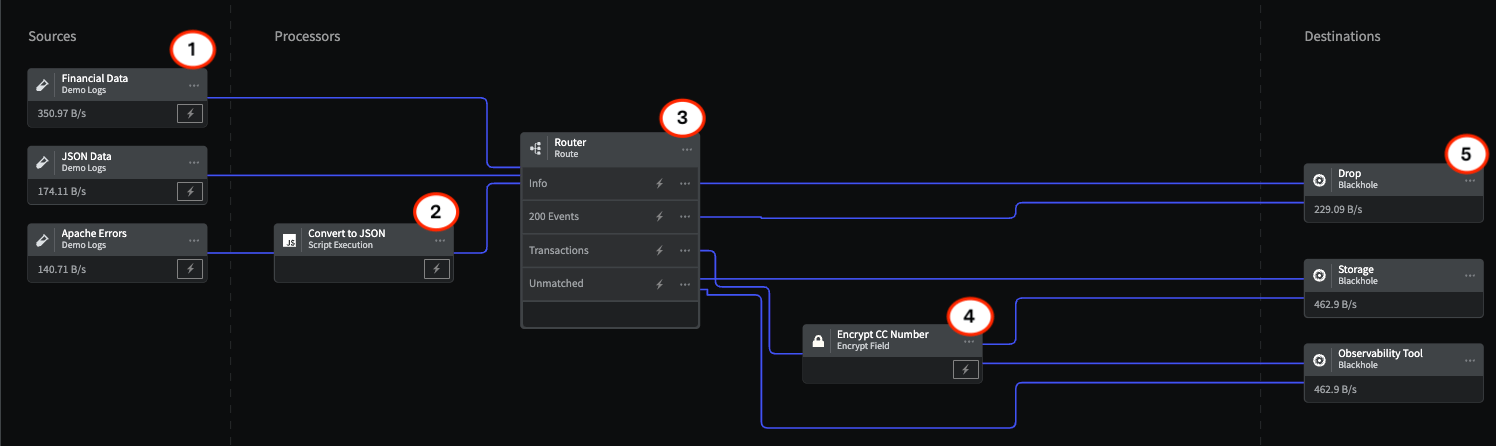
This schematic illustrates the configuration of a Routing group, which includes a Script Execution Processor to format raw strings to JSON, that routes different data types from several sources through specialized processing chains to several destinations.
## Interactive Demo
You can see how data is processed and routed through a Pipeline with this interactive demo.
\
## 1 - Sources
The Sources represent three different types of data flowing through the Pipeline that need to be routed to separate processing chains:
1. **Financial Data** that needs to have Personally Identifying Information encrypted before being sent to storage and the observability tool.
2. **JSON Data** that needs to have Status - 200 **events** routed and dropped.
3. **Apache Errors** that need to be converted to JSON format and all info messages dropped.
1) Log into the Mezmo App, and in the **Pipelines** section, click **New Pipeline**.
2) Add three **Demo Logs** Sources, and for **Format**, select 1) **Financial Data** 2) **JSON** 3) **Apache Errors**.
3) Add three **Blackhole** Destinations to your Pipeline to represent 1) **Drop** 2) **Storage** 3) **Observability Tool**.
4) Add the Processors and their configurations as shown in this example.
5) To view the data transformations through the Processors, **Deploy** the Pipeline, and then click the **Tap** for the Source and each Processor to see the data as it egresses from each node.
If you don't yet have a Mezmo account, you can [sign up for a 30 Day Free Trial](https://www.mezmo.com/sign-up-pipeline-today) to try us out!
## 2 - Script Execution Processor
The [Script Execution Processor](/telemetry-pipelines/js-script-processor) is configured to convert the Apache errors from raw strings to JSON format.
```bash theme={null}
function junk(message) {
var new_message = {}
new_message.message = message
return new_message
}
```
## 3 - Route Processor
The [Route Processor](/telemetry-pipelines/route-processor) uses three conditional statements to identify and route specific components of all three data types:
#### Apache Info Messages
```javascript theme={null}
if (exists(.message) AND .message contains 'INFO')
```
Because both the JSON and Apache errors data contain .message fields, this statement uses AND to make sure that .messages that don't contain the INFO event won't generate a "field not found" error. All messages meeting this criteria are sent to the Drop Destination.
#### Status 200 Events
```javascript theme={null}
if (exists(.status) AND .status equal 200)
```
All events that meet these criteria are sent to the Drop Destination.
#### Transaction Events
```bash theme={null}
if (exists(.event) AND .event equal 'transaction')
```
All events that meet these criteria are send to the Encrypt Processor.
## 4 - Encrypt Processor
Because transaction events contain Personally Identifying Information (PII), such as credit card numbers, this information needs to be encrypted before being sent to storage and observability tools. For more information, check out the topic [Tutorial: Mask and Encrypt Data](/practioner-guide-data-optimization/pipeline-module--security-and-compliance).
**Encrypt Processor Configuration**
| Configuration Field | Details |
| -------------------------------- | ------------------------------------------------- |
| Field | .transaction.cc.cc\_number |
| Encryption algorithm | AES-256-CFB (key=32 characters, iv-16 characters) |
| Encryption key | zipadeedoodah012zipadeedoodah013 |
| Initialization vector (IV) field | .creditcardnumber |
## 5 - Destinations
The routed data is sent to three destination, represented in this schematic by the [Black Hole Destination](/telemetry-pipelines/blackhole-destination):
1. **Drop**, where the unnecessary INFO and Status - 200 messages are sent.
2. **Storage**, where all unmatched data and encrypted PII data is sent.
3. **Observability Tool,** where all unmatched data and encrypted PII data is sent.
The [Blackhole](/telemetry-pipelines/blackhole-destination) Destination drops all data sent to it. This makes it useful for testing your Processor chain to make sure you are getting the expected results before sending them on to a production Destination. Mezmo supports a wide variety of popular Destinations including [Mezmo Log Analysis](/telemetry-pipelines/mezmo-destination), [Datadog Metrics](/telemetry-pipelines/datadog-metrics-destination), and [Prometheus Remote Write](/telemetry-pipelines/prometheus-remote-write-destination).
 ## Interactive Demo
You can see how data is processed and routed through a Pipeline with this interactive demo.
\
## 1 - Sources
The Sources represent three different types of data flowing through the Pipeline that need to be routed to separate processing chains:
1. **Financial Data** that needs to have Personally Identifying Information encrypted before being sent to storage and the observability tool.
2. **JSON Data** that needs to have Status - 200 **events** routed and dropped.
3. **Apache Errors** that need to be converted to JSON format and all info messages dropped.
## Interactive Demo
You can see how data is processed and routed through a Pipeline with this interactive demo.
\
## 1 - Sources
The Sources represent three different types of data flowing through the Pipeline that need to be routed to separate processing chains:
1. **Financial Data** that needs to have Personally Identifying Information encrypted before being sent to storage and the observability tool.
2. **JSON Data** that needs to have Status - 200 **events** routed and dropped.
3. **Apache Errors** that need to be converted to JSON format and all info messages dropped.