> ## Documentation Index
> Fetch the complete documentation index at: https://docs.mezmo.com/llms.txt
> Use this file to discover all available pages before exploring further.
# Mask and Encrypt Data
> Build a data compliance processor group that routes events through Redact and Encrypt Field Processors to obfuscate PII such as user IDs and credit card numbers.
## The Situation
This Pipette depicts the typical configuration of a Data Compliance processor group within a Telemetry Pipeline. In this situation, the objectives are to send financial transaction and account access data to a storage location in case it is needed for later analysis, and to redact or encrypt Personally Identifying Information (PII).
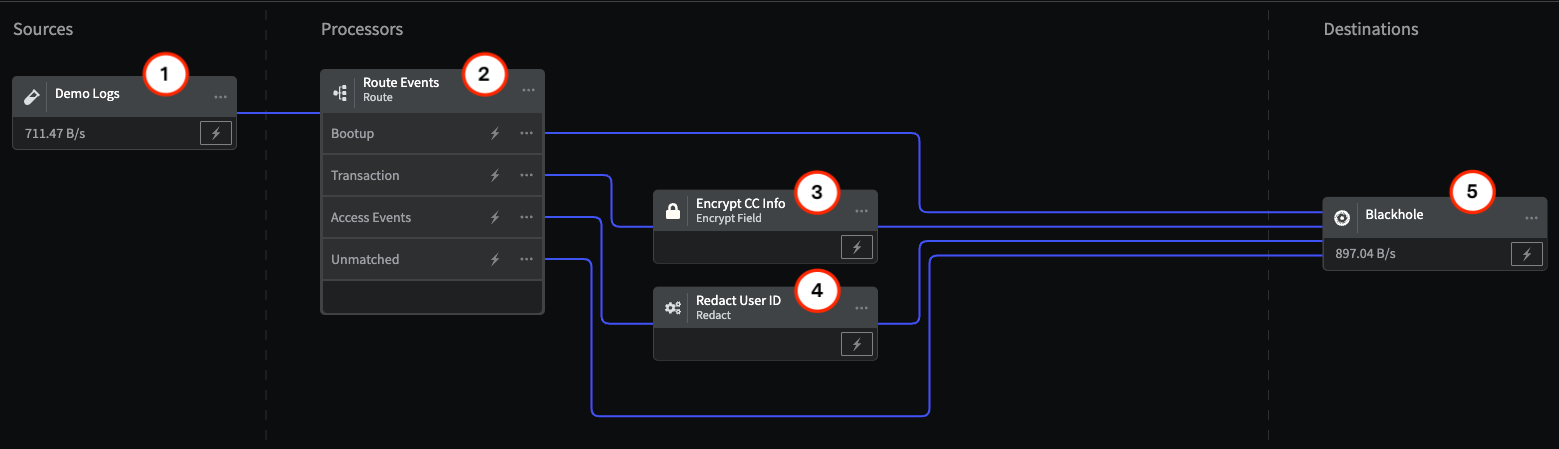
This group uses the [Route Processor](/telemetry-pipelines/route-processor) to send specific events to the [Redact Processor](/telemetry-pipelines/redact-processor) and the [Encrypt Field Processor](/telemetry-pipelines/encrypt-fields-processor), before storage, to obfuscate user IDs and credit card numbers, and to also enable the decryption of credit card numbers in case they are needed for specific analysis.
## Interactive Demo
This demo demonstrates the configuration of a processor chain for encrypting and redacting data.
\
## Overview
This schematic of the Pipette illustrates the Processor chain for redacting and encrypting Personally Identifying Information focusing on login User IDs and credit card numbers. The Processor configurations are described in detail in the sections that match the numbers in the schematic.
## Interactive Demo
This demo demonstrates the configuration of a processor chain for encrypting and redacting data.
\
## 1 - Demo Logs Source
This Pipette uses the [Demo Logs](/telemetry-pipelines/demo-logs-source) with the **Financial Data** option to send a sample of data containing PII through the Processor chain.
1. Log into the Mezmo App, and in the **Pipelines** section, click **New Pipeline**.
2. Add the **Demo Logs** Source, and for **Format**, select **Financial Data**.
3. Add the **Blackhole** Destination to your Pipeline, and connect it to the Demo Logs.
4. Add the Processors and their configurations as shown in this example.
5. To view the data transformations through the Processors, **Deploy** the Pipeline, and then click the **Tap** for the Source and each Processor to see the data as it egresses from each node. You will also be able to see how the data is reduced on the Pipeline Dashboard.
If you don't yet have a Mezmo account, you can [sign up for a 30 Day Free Trial](https://www.mezmo.com/sign-up-pipeline-today) to try us out!
## 2 - Route Processor
The [Route Processor](/telemetry-pipelines/route-processor) enables you to set conditions under which telemetry data will be sent to other points in the processing chain. In this case, it filters three types of events from the incoming data for processing: Access, Transaction, and Boot-up. Any events that don't match these three types are sent directly to the storage location.
| Configuration Parameter | Setting |
| -------------------------------------------- | --------------------------------- |
| Conditional Statement for Boot-up Events | `if (.event equal 'bootup')` |
| Conditional Statement for Transaction Events | `if (.event equal 'transaction')` |
| Conditional Statement for | `if (.event equal 'access')` |
## 3 - Encrypt Processor
The transaction events contain credit card information that should be redacted or encrypted before being sent to storage. In this case, since the credit card numbers may be needed later, for example for fraud analysis, the [Encrypt Field Processor](/telemetry-pipelines/encrypt-fields-processor) is set to encrypt the card numbers, so that they can later be decrypted using the encryption key.
| Configuration Parameter | Setting |
| --------------------------------------------- | -------------------------------------------------- |
| Field | `.transaction.cc.cc_number` |
| Encryption algorithm | `AES-256-CFB(key=32 characters, iv=16 characters)` |
| Encryption key | `zipadeedoodah777zipadeedoodah888` |
| Initialization vector (IV) field | `.creditcardnumber` |
| Encode encrypted field and IV as Base 64 text | On |
## 4 - Redact Processor
Information that is redacted is obfuscated completely, and cannot be recovered after processing. For this reason, the [Redact Processor](/telemetry-pipelines/redact-processor) should be used to remove PII that is particularly sensitive, but doesn't need to be used for later analysis. In this case, the login User ID from Access events is redacted, since this is information that could be used to hack user accounts, but isn't needed for analysis. The Processor operation is based on searching for specific patterns, such as social security numbers or email addresses, or custom patterns, and then using a hash or replacement pattern to obfuscate the data. In this case, it searches the field`.access.user_id` for a custom pattern based on a regular expression, and then hashes it using the md5 algorithm.
| Configuration Parameter | Setting |
| ----------------------- | ----------------- |
| Field | `.access.user_id` |
| Redact Pattern | `Custom Pattern` |
| Action | `Hash` |
| Algorithm | `md5` |
| Expression | `[a-zA-Z0-9@.]+` |
## 5 - Blackhole Destination
The [Blackhole](/telemetry-pipelines/blackhole-destination) Destination drops all data sent to it. This makes it useful for testing your Processor chain to make sure you are getting the expected results before sending them on to a production destination. Mezmo supports a wide variety of popular destinations including [Mezmo Log Analysis](/telemetry-pipelines/mezmo-destination), [Datadog Metrics](/telemetry-pipelines/datadog-metrics-destination), and [Prometheus Remote Write](/telemetry-pipelines/prometheus-remote-write-destination).
In this case, note that the data volume from the Source to the Destination has increased by almost 22%. It's typical for data volume to increase with these Processors because they add characters to the message strings. However, fine tuning of the algorithms and encryption keys can limit the increase in data volume.
## For More Information
For more information on how to implement security modules for your Pipeline data management needs, [contact our Solutions Engineering team](https://go.mezmo.com/mezmo-data-profiling?_gl=1*189zkyo*_ga*NDQxOTc0Mzg1LjE2NDE0MTYxODc.*_ga_C3EJ23NJFV*MTcxMTU3ODkyNi45OC4xLjE3MTE1Nzg5MzIuMC4wLjA.) to schedule a free consultation.
 ## Interactive Demo
This demo demonstrates the configuration of a processor chain for encrypting and redacting data.
\
## 1 - Demo Logs Source
This Pipette uses the [Demo Logs](/telemetry-pipelines/demo-logs-source) with the **Financial Data** option to send a sample of data containing PII through the Processor chain.
## Interactive Demo
This demo demonstrates the configuration of a processor chain for encrypting and redacting data.
\
## 1 - Demo Logs Source
This Pipette uses the [Demo Logs](/telemetry-pipelines/demo-logs-source) with the **Financial Data** option to send a sample of data containing PII through the Processor chain.