> ## Documentation Index
> Fetch the complete documentation index at: https://docs.mezmo.com/llms.txt
> Use this file to discover all available pages before exploring further.
# Search Tips
> Troubleshoot vague queries, unexpected matches, symbol warnings, and case-sensitivity issues, and interpret Mezmo's search syntax feedback.
Searches that return no results are usually caused by searches that are too vague.
For example, searching for `the` or another common word would result in an excessive number of results, and not all of them will be displayed. For this reason, Mezmo doesn’t support single-character searches.
To avoid this problem, try using the exact match operator such as equal (`:==`) instead of the prefix match operator (`:`). You should also search on a specific field, instead of the entire log. Lastly, if you know exactly how your search term appears in your logs, you can enable case sensitivity by using the `:===` operator.
### Unexpected Results
Mezmo searches visible fields as well as internal fields, such as metadata and the raw log message. Your query can match on these "invisible" fields, resulting in the log appearing in the results.
You can override this by specifying the field to search. For example, if your logs contain a `level` field and you want to find error-level logs, enter `level:error` as your query instead of just `error`.
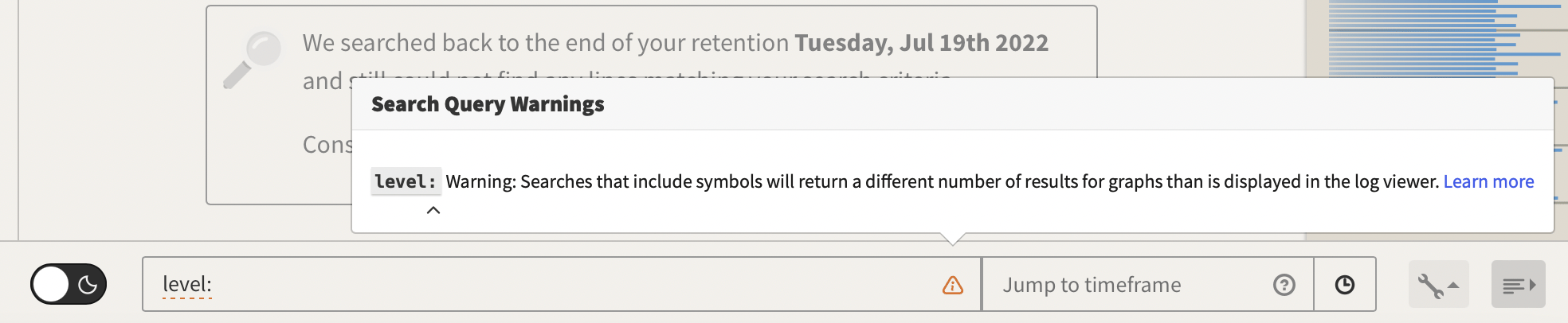
### Search Query Warnings
The warning `Unsupported visualizations query: symbols` is displayed whenever any symbols are used in a query, for example, `/` , `+`, etc. There is no issue with your query and search results. The warning shows up to let you know that the query was performed without the symbols to populate the Graphs or Timeline Graphs.
To search for symbols in they must be wrapped in quotes.
### Camel Cased Words And Case Sensitivity
When logs lines are stored and indexed, compound words with internal capitalization like `SyntaxError` get split up into separate words, `Syntax` and `Error`. This means that performing a search (defaults to case insensitive) for `syntaxerror` may not return lines containing that term because it was not stored that way. You will need to query for 'SyntaxError' to match the original form in this case.
### Search Feedback
When searching, the Mezmo app will provide feedback if a search is correct.
**Field Search Correct Syntax**
The search will highlight a yellow color.
 **Field Search Incorrect Syntax**
The search will have a red underline and offer tips by clicking on the red triangle.
**Field Search Incorrect Syntax**
The search will have a red underline and offer tips by clicking on the red triangle.
 **Simple Search Feedback**
Simple text searches do not show if a search is correct or not.
**Simple Search Feedback**
Simple text searches do not show if a search is correct or not.