> ## Documentation Index
> Fetch the complete documentation index at: https://docs.mezmo.com/llms.txt
> Use this file to discover all available pages before exploring further.

# OpsGenie Alert Integration

> Create OpsGenie alerts from Mezmo log data by configuring test, presence, and absence alerts with an OpsGenie API integration key.

The OpsGenie alert integration interacts with the [OpsGenie Alert API ](https://docs.opsgenie.com/docs/alert-api)and enables users to create alerts in OpsGenie based off of log data in Mezmo.
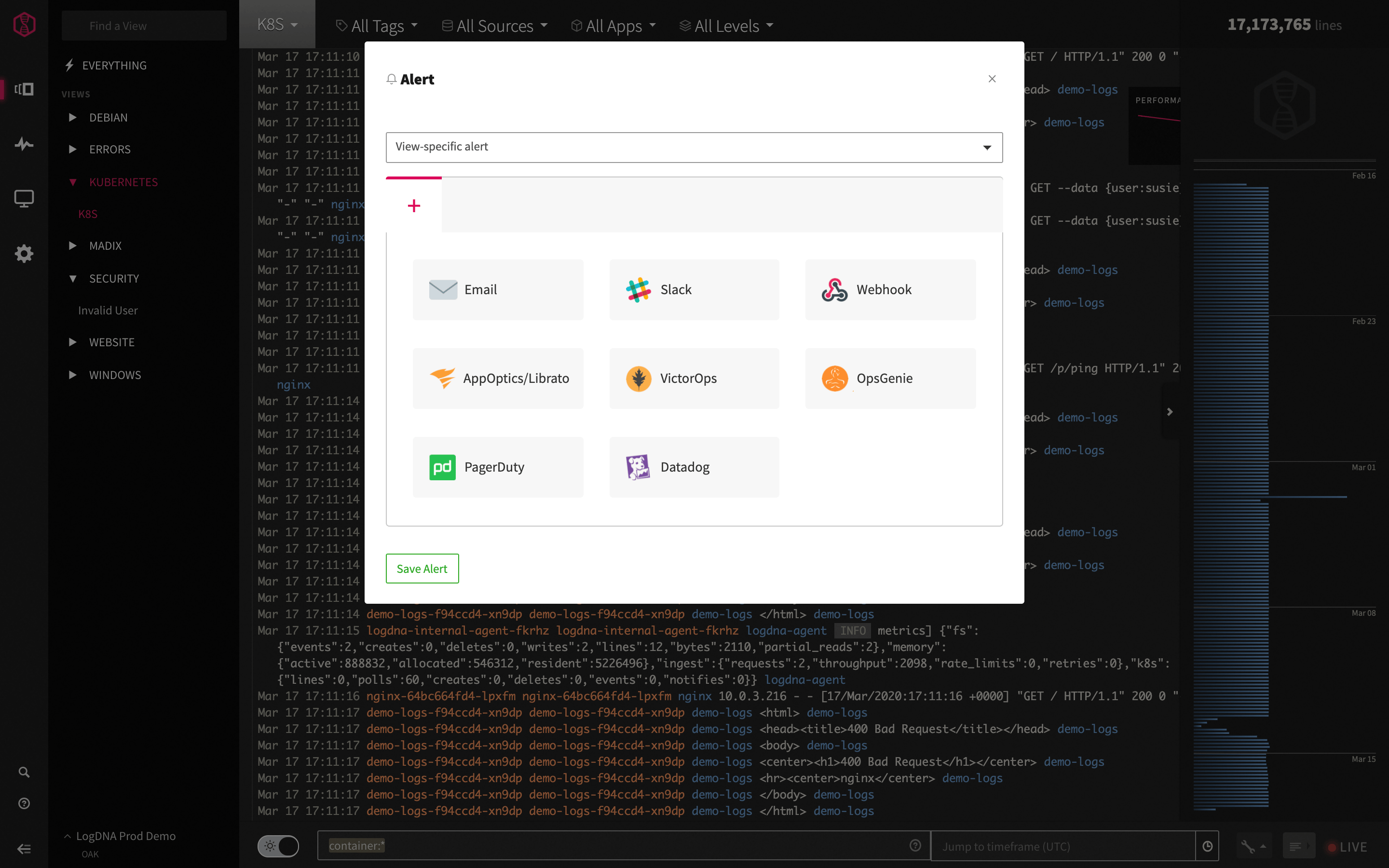
<img src="https://mintcdn.com/mezmo-9a59581a/5cIdgEAM73o6sWZ8/images/docs/f8892pu2738xjvwp5kkc7bokckpzg0qb05fcyvold9yulpf1hxhux0riy2itqytz.png?fit=max&auto=format&n=5cIdgEAM73o6sWZ8&q=85&s=7cf45ef0f78b81009c246fb9f8337a48" alt="" width="2880" height="1800" data-path="images/docs/f8892pu2738xjvwp5kkc7bokckpzg0qb05fcyvold9yulpf1hxhux0riy2itqytz.png" />

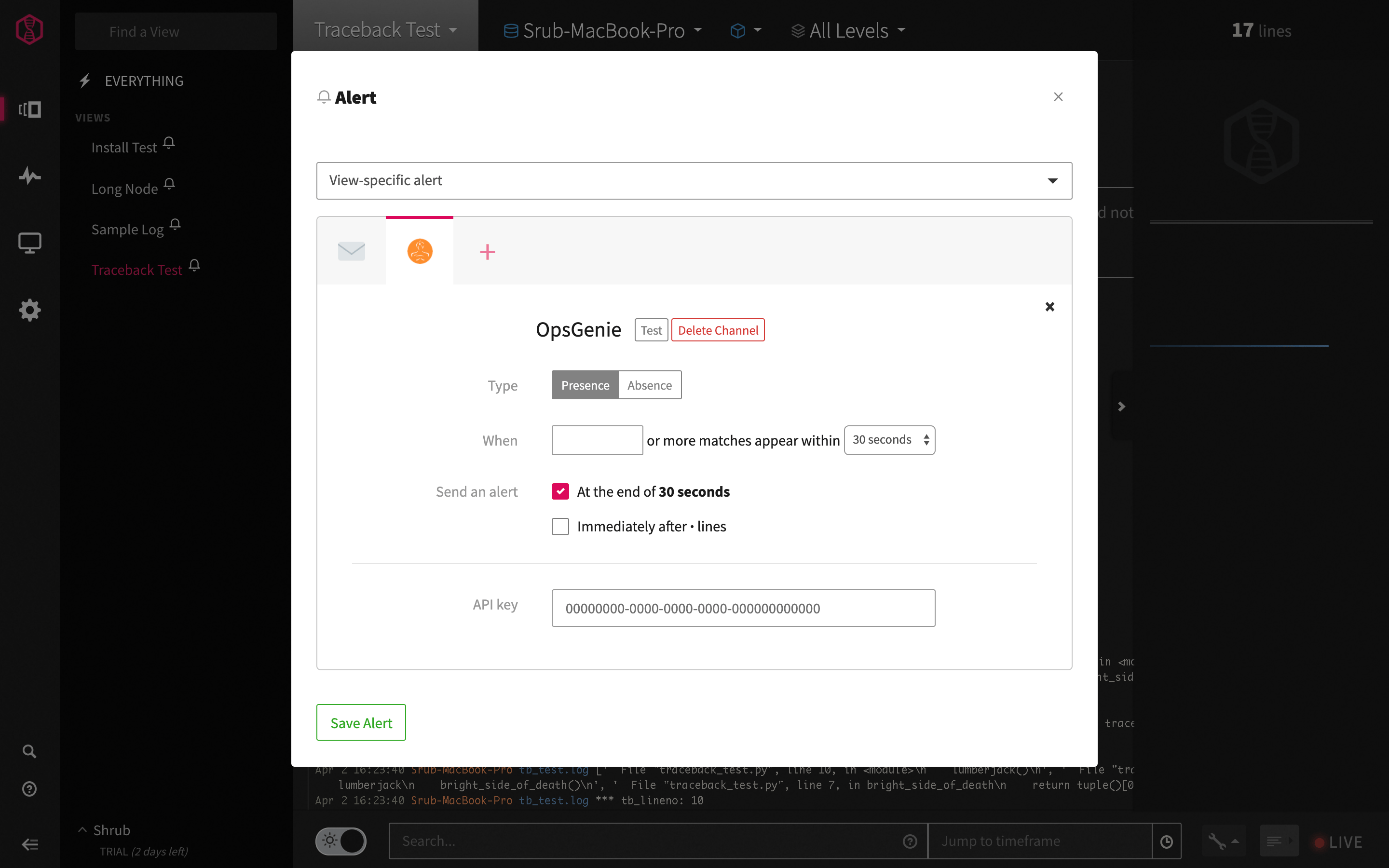
After clicking on OpsGenie- a window pops up with options for test, presence and absence alerts.

Test alerts allow the user to test with a third party integration, presence alerts send alerts to the third party integration after a criteria is met (i.e. 5 or more matches within 30 seconds) and [absence alerts](https://www.mezmo.com/blog/logdna-absence-alerting) send an alert when there are fewer log lines than anticipated.
<img src="https://mintcdn.com/mezmo-9a59581a/5cIdgEAM73o6sWZ8/images/docs/f8892pu2738xjvwp5kkc7bokckpzg0qb05fcyvold9yulpf1hxhux0riy2itqytz.png?fit=max&auto=format&n=5cIdgEAM73o6sWZ8&q=85&s=7cf45ef0f78b81009c246fb9f8337a48" alt="" width="2880" height="1800" data-path="images/docs/f8892pu2738xjvwp5kkc7bokckpzg0qb05fcyvold9yulpf1hxhux0riy2itqytz.png" />

<img src="https://mintcdn.com/mezmo-9a59581a/uS5U7z9j4833qA9M/images/docs/tx4weutuq2n30ai6p87vk1suwdzmoz5j1tf2dtwna9z99zvlnak8fr175aaimluo.png?fit=max&auto=format&n=uS5U7z9j4833qA9M&q=85&s=0cc445c4009c1c0fc28305493941c807" alt="" width="2880" height="1800" data-path="images/docs/tx4weutuq2n30ai6p87vk1suwdzmoz5j1tf2dtwna9z99zvlnak8fr175aaimluo.png" />

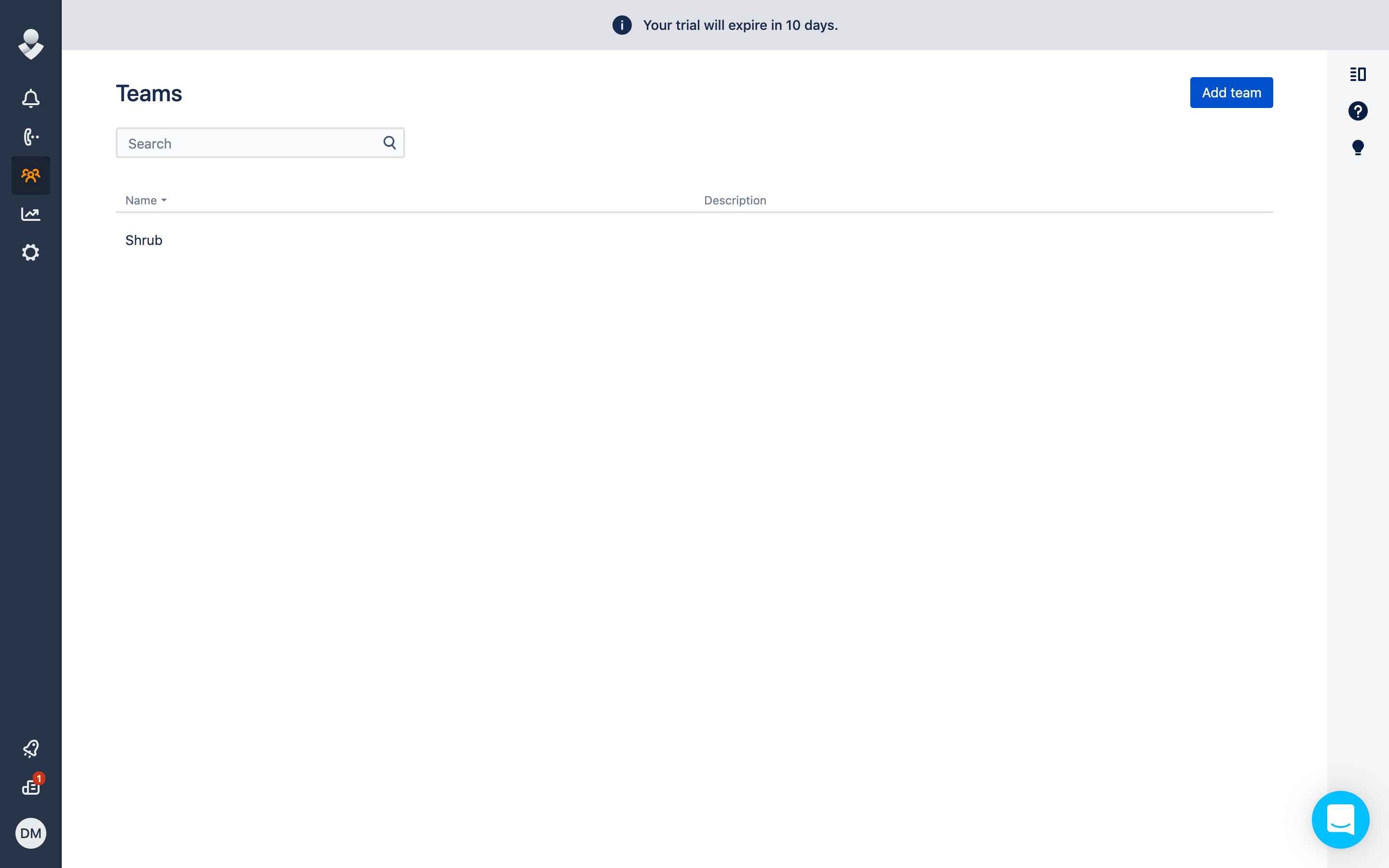
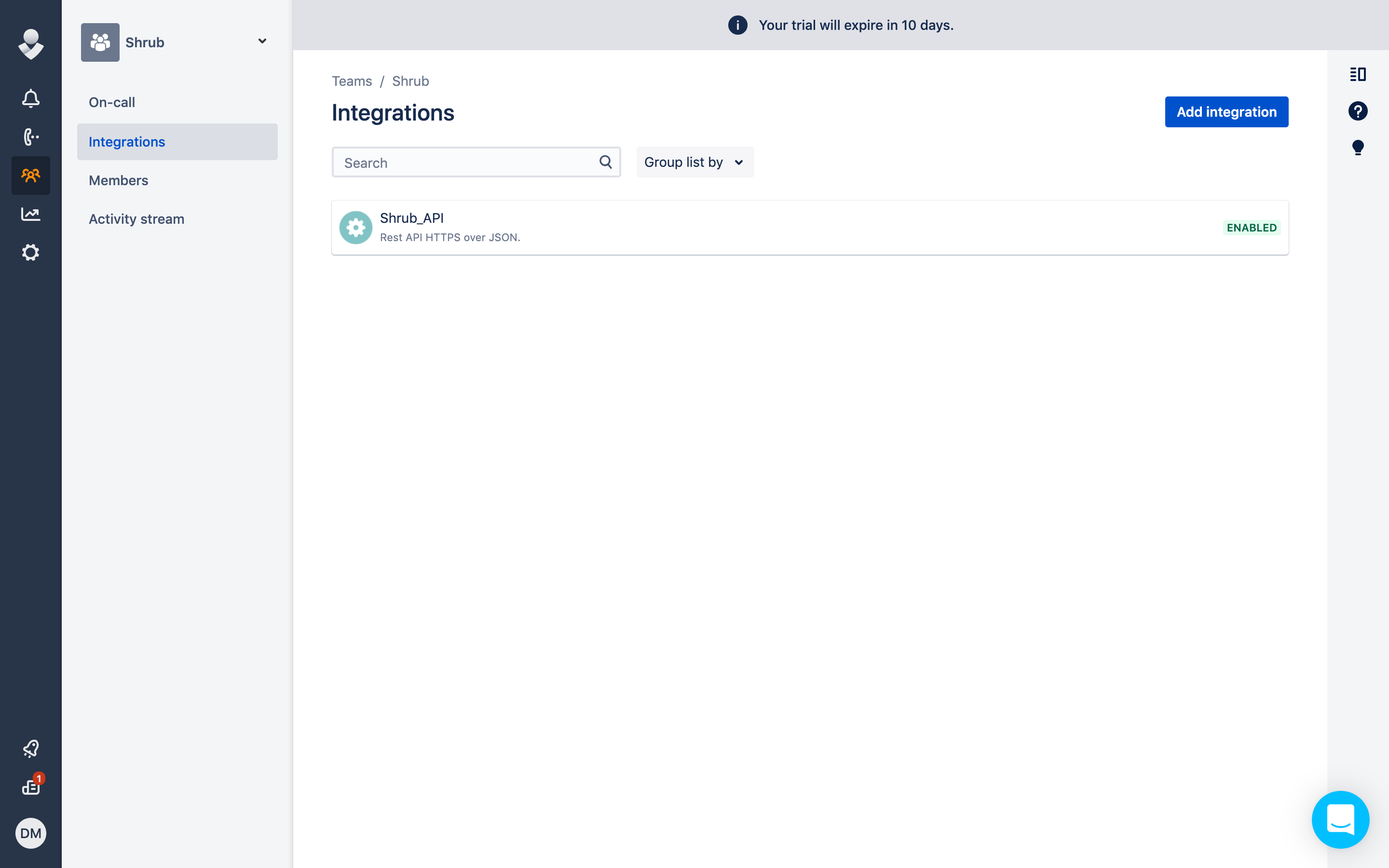
To retrieve the API key from OpsGenie- go to Teams >  Integrations > Add Integration > API Integration. Input the API key into the API key section of the Mezmo OpsGenie alert integration (shown above).
<img src="https://mintcdn.com/mezmo-9a59581a/5cIdgEAM73o6sWZ8/images/docs/f8892pu2738xjvwp5kkc7bokckpzg0qb05fcyvold9yulpf1hxhux0riy2itqytz.png?fit=max&auto=format&n=5cIdgEAM73o6sWZ8&q=85&s=7cf45ef0f78b81009c246fb9f8337a48" alt="" width="2880" height="1800" data-path="images/docs/f8892pu2738xjvwp5kkc7bokckpzg0qb05fcyvold9yulpf1hxhux0riy2itqytz.png" />

<img src="https://mintcdn.com/mezmo-9a59581a/uS5U7z9j4833qA9M/images/docs/tx4weutuq2n30ai6p87vk1suwdzmoz5j1tf2dtwna9z99zvlnak8fr175aaimluo.png?fit=max&auto=format&n=uS5U7z9j4833qA9M&q=85&s=0cc445c4009c1c0fc28305493941c807" alt="" width="2880" height="1800" data-path="images/docs/tx4weutuq2n30ai6p87vk1suwdzmoz5j1tf2dtwna9z99zvlnak8fr175aaimluo.png" />

<img src="https://mintcdn.com/mezmo-9a59581a/5cIdgEAM73o6sWZ8/images/docs/5ka6drr4mz22h8lb97xm4e2wy5sp5jdimxnifozco0tx18x02mjnz4f319twrvuz.png?fit=max&auto=format&n=5cIdgEAM73o6sWZ8&q=85&s=65f396aefa94ca3b5c95f93b7864729a" alt="" width="2880" height="1800" data-path="images/docs/5ka6drr4mz22h8lb97xm4e2wy5sp5jdimxnifozco0tx18x02mjnz4f319twrvuz.png" />

<img src="https://mintcdn.com/mezmo-9a59581a/5cIdgEAM73o6sWZ8/images/docs/f8892pu2738xjvwp5kkc7bokckpzg0qb05fcyvold9yulpf1hxhux0riy2itqytz.png?fit=max&auto=format&n=5cIdgEAM73o6sWZ8&q=85&s=7cf45ef0f78b81009c246fb9f8337a48" alt="" width="2880" height="1800" data-path="images/docs/f8892pu2738xjvwp5kkc7bokckpzg0qb05fcyvold9yulpf1hxhux0riy2itqytz.png" />

<img src="https://mintcdn.com/mezmo-9a59581a/uS5U7z9j4833qA9M/images/docs/tx4weutuq2n30ai6p87vk1suwdzmoz5j1tf2dtwna9z99zvlnak8fr175aaimluo.png?fit=max&auto=format&n=uS5U7z9j4833qA9M&q=85&s=0cc445c4009c1c0fc28305493941c807" alt="" width="2880" height="1800" data-path="images/docs/tx4weutuq2n30ai6p87vk1suwdzmoz5j1tf2dtwna9z99zvlnak8fr175aaimluo.png" />

<img src="https://mintcdn.com/mezmo-9a59581a/5cIdgEAM73o6sWZ8/images/docs/5ka6drr4mz22h8lb97xm4e2wy5sp5jdimxnifozco0tx18x02mjnz4f319twrvuz.png?fit=max&auto=format&n=5cIdgEAM73o6sWZ8&q=85&s=65f396aefa94ca3b5c95f93b7864729a" alt="" width="2880" height="1800" data-path="images/docs/5ka6drr4mz22h8lb97xm4e2wy5sp5jdimxnifozco0tx18x02mjnz4f319twrvuz.png" />

<img src="https://mintcdn.com/mezmo-9a59581a/uS5U7z9j4833qA9M/images/docs/w98u1af7gegyx3wfg2n1d1y3g5mgnp4yr0rqmiy175asl6s92oug6qwg7k73rk1g.png?fit=max&auto=format&n=uS5U7z9j4833qA9M&q=85&s=733e1091e14d874799eea40cde7d3b27" alt="" width="2880" height="1800" data-path="images/docs/w98u1af7gegyx3wfg2n1d1y3g5mgnp4yr0rqmiy175asl6s92oug6qwg7k73rk1g.png" />

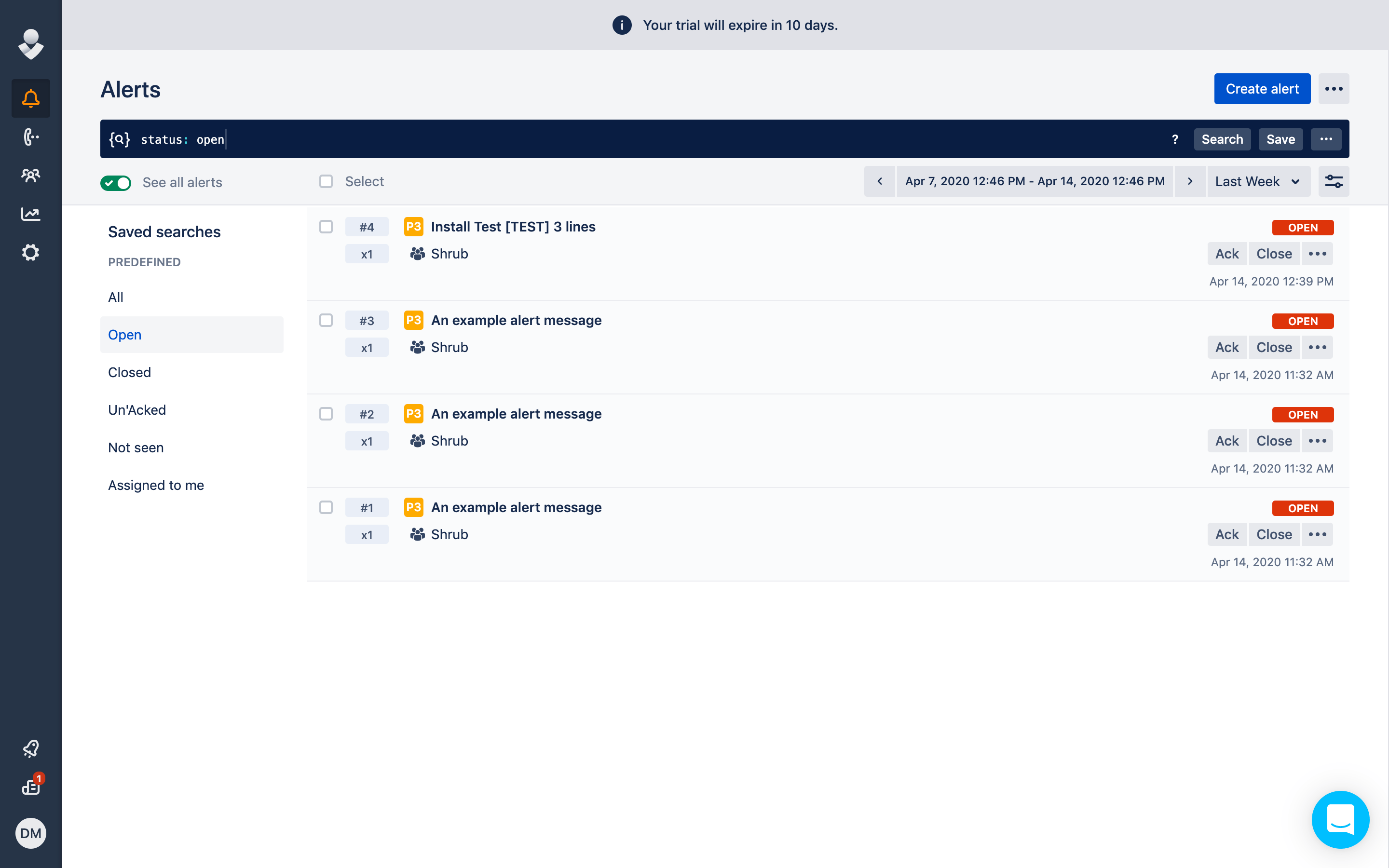
After saving the alert or hitting test from your Mezmo window- the alert will now appear in OpsGenie under Alerts! The first alert is an example Mezmo test alert integrated with OpsGenie.
<img src="https://mintcdn.com/mezmo-9a59581a/5cIdgEAM73o6sWZ8/images/docs/f8892pu2738xjvwp5kkc7bokckpzg0qb05fcyvold9yulpf1hxhux0riy2itqytz.png?fit=max&auto=format&n=5cIdgEAM73o6sWZ8&q=85&s=7cf45ef0f78b81009c246fb9f8337a48" alt="" width="2880" height="1800" data-path="images/docs/f8892pu2738xjvwp5kkc7bokckpzg0qb05fcyvold9yulpf1hxhux0riy2itqytz.png" />

<img src="https://mintcdn.com/mezmo-9a59581a/uS5U7z9j4833qA9M/images/docs/tx4weutuq2n30ai6p87vk1suwdzmoz5j1tf2dtwna9z99zvlnak8fr175aaimluo.png?fit=max&auto=format&n=uS5U7z9j4833qA9M&q=85&s=0cc445c4009c1c0fc28305493941c807" alt="" width="2880" height="1800" data-path="images/docs/tx4weutuq2n30ai6p87vk1suwdzmoz5j1tf2dtwna9z99zvlnak8fr175aaimluo.png" />

<img src="https://mintcdn.com/mezmo-9a59581a/5cIdgEAM73o6sWZ8/images/docs/5ka6drr4mz22h8lb97xm4e2wy5sp5jdimxnifozco0tx18x02mjnz4f319twrvuz.png?fit=max&auto=format&n=5cIdgEAM73o6sWZ8&q=85&s=65f396aefa94ca3b5c95f93b7864729a" alt="" width="2880" height="1800" data-path="images/docs/5ka6drr4mz22h8lb97xm4e2wy5sp5jdimxnifozco0tx18x02mjnz4f319twrvuz.png" />

<img src="https://mintcdn.com/mezmo-9a59581a/uS5U7z9j4833qA9M/images/docs/w98u1af7gegyx3wfg2n1d1y3g5mgnp4yr0rqmiy175asl6s92oug6qwg7k73rk1g.png?fit=max&auto=format&n=uS5U7z9j4833qA9M&q=85&s=733e1091e14d874799eea40cde7d3b27" alt="" width="2880" height="1800" data-path="images/docs/w98u1af7gegyx3wfg2n1d1y3g5mgnp4yr0rqmiy175asl6s92oug6qwg7k73rk1g.png" />

<img src="https://mintcdn.com/mezmo-9a59581a/5cIdgEAM73o6sWZ8/images/docs/4g362r9rjb6ukzw9mxraritdpcul1kpl592u0n3n7zkqkmjc7ytgf2npdd7eojpk.png?fit=max&auto=format&n=5cIdgEAM73o6sWZ8&q=85&s=ef4a8203db2eb15ceb59a4656e077fc0" alt="" width="2880" height="1800" data-path="images/docs/4g362r9rjb6ukzw9mxraritdpcul1kpl592u0n3n7zkqkmjc7ytgf2npdd7eojpk.png" />

**NOTE**: The US OpsGenie endpoint is used by default.  If using the EU OpsGenie endpoint is required please reach out to [support@mezmo.com](mailto:support@mezmo.com).
