> ## Documentation Index
> Fetch the complete documentation index at: https://docs.mezmo.com/llms.txt
> Use this file to discover all available pages before exploring further.
# Automatically Parsed Log Line Components
> Learn how Mezmo automatically parses log lines into string, source, application, JSON, and metadata components for search and analysis.
As Mezmo [ingests your logs](/docs/ingestion), it automatically parses information from your log lines, including string components, source information, application information, JSON objects, and user-specified metadata. You can then use [Mezmo search features](/docs/search-and-filter) to analyze data in your logs. This topic describes the various types of information that Mezmo parses, along with notes on how it is parsed. [Parse Logs with Custom Templates](/docs/parse-logs-with-custom-templates) contains additional information about using custom parsing templates.
You can identify parsed lines in Views by selecting a line and viewing the data.
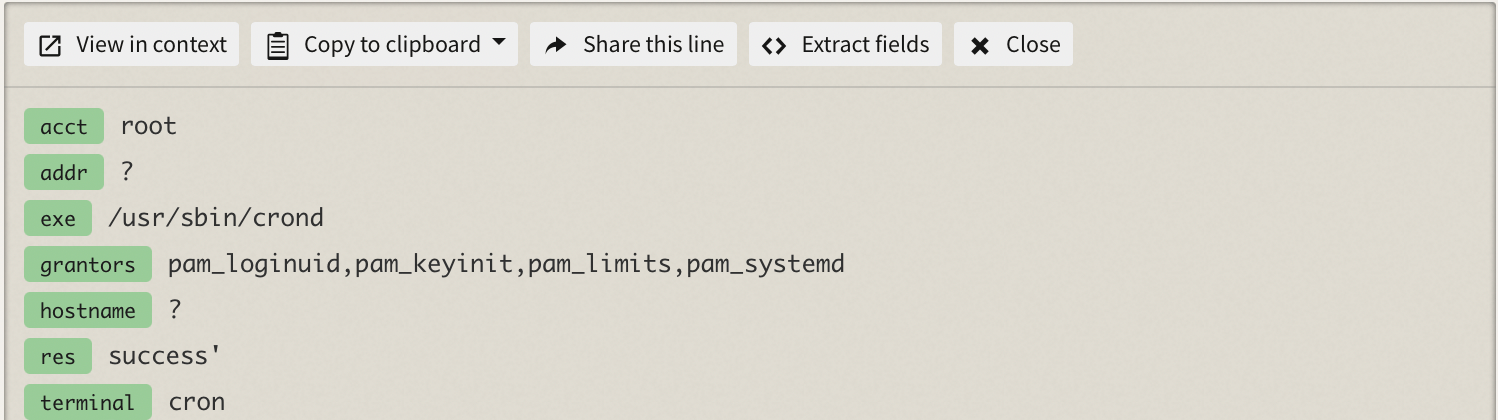 If your parsed fields contain inconsistent value types, field parsing may fail, but the line will be preserved if possible. For example, if a line is passed with a `meta` object, such as `meta.myfield` of type `String`, any subsequent lines with `meta.myfield` must have `String` as the value type. This applies to all parsed fields, including JSON.
## Log Line String Components
Most log line strings contain three components: **Message**, **Timestamp**, and **Log Level**.
### Message
Message is a string that represents the core descriptive component of a log line. It is usually preceded by timestamp and log level. A message typically contains a mixture of static and variable substrings, and is human-readable. For example, `User myemail@email.com requested /API/accountdetails/`
### Timestamp
Timestamp is required for all ingested log lines. For Mezmo log ingestion to correctly parse a timestamp, it should follow [the ISO 8601 format](https://www.iso.org/iso-8601-date-and-time-format.html).
### Log Level
Log level typically follows timestamp and is automatically parsed. Mezmo log ingestion parses common log level formats, such as a timestamp followed by a separator followed by the log level. Common log levels include:
* `CRITICAL`
* `DEBUG`
* `EMERGENCY`
* `ERROR`
* `FATAL`
* `INFO`
* `SEVERE`
* `TRACE`
* `WARN`
* `ALERT`
* `IP address`
* `MAC address`
## Source Information Metadata
Mezmo also parses source information metadata from log lines, which is listed in the **All Sources** menu in the web app. The only required parameter is **hostname**.
### Hostname
A hostname is the name of the log line source, and is automatically parsed by the [Mezmo Logging Agent](/docs/introducing-the-agent), as well as [Syslog based ingestion](/docs/syslog). However, when you are sending log lines for ingestion with the REST API or a [code library](/docs/code-libraries), you must specify the host name.
### Tags
You can use a tag to group lines, and more than one tag can be applied to a single line. Tags are listed in the **All Tags** menu in the web app. Tagging is supported by both the [Mezmo Logging Agent](/docs/introducing-the-agent) as well as custom-template supported [Syslog based ingestion](/docs/syslog) such as rsyslog or syslog-ng.
### Other information
Other optional source information includes:
* IP address
* MAC address
The [Mezmo Logging Agent](/docs/introducing-the-agent) automatically parses this information, and you specify it for the REST API. The Mezmo Agent also parses some instance metadata, such as instance type.
## Application Information Metadata
In addition to source information, Mezmo can also parse application information from log lines. The [Mezmo Logging Agent](/docs/introducing-the-agent) automatically parses the application name as the filename (for example: `error.log`) while [Syslog based ingestion](/docs/syslog) uses the syslog-generated `APP-NAME` tag. For the REST API and [code library](/docs/code-libraries), you must specify the app name.
## Automatic and Custom Parsing for Field Search
Mezmo automatically parses certain types of log lines that enable the use of field search for those lines.
## JSON Parsing
Be aware that the size of sent log data can increase after the JSON string is parsed in Node.js. Measurement is based on how much data is ingested into Mezmo, after it is parsed as JSON, and not how much data is sent in a line.
Messages that end in a curly brace, `}` are parsed even if the JSON doesn't contain the entire message.
If you don't want your JSON to be parsed, add an additional character after the ending curly brace such as a period.
If your JSON has a `message` field, it will be used for display and search in the log viewer. We also parse out, and override any existing, log levels if you include a `level` field.
### Reserved and Protected Fields
In parsed JSON lines, there are reserved fields to keep track of specific types of data. They can be identified by the prepended underscore(\_).
Using the reserved fields in your root JSON object will result in an underscore (\_) prepended to those fields inside the context menu, for example `status` is stored as `_status`.
Common reserved fields:
* `_source`
* `_type`
* `_tag`
* `_auth`
* `_bytes`
* `_connect`
* `_method`
* `_namespace`
* `_path`
* `_pod`
* `_request`
* `_response`
* `_service`
* `_space`
* `_status`
* `_timestamp`
* `_user`
Protected field names cannot be used in your object, and are removed by Mezmo when encountered. The protected field names are:
* `_account`
* `_retention`
### Mezmo Reserved Fields
Fields with the annotation \_`mezmo_` are reserved for Mezmo-specific data.
`_mezmo_line_size`
Indicates the number of bytes attributed to a log line. You can view a line's size by clicking on it in the Log Viewer.
## Metadata
Metadata is a field reserved for custom information associated with a log line. Sending metadata is currently supported by the [Ingestion REST API](/docs/api-referencesk9h#ingest), as well as our [Node.JS ](https://github.com/logdna/logger-node/blob/main/README.md)and [Python](https://github.com/logdna/python/blob/master/README.md) code libraries.
## Parsed Log Sources
Mezmo parses lines from these sources:
* Akamai
* Ansible
* Apache
* Aptible
* AWS CloudWatch
* AWS ELB
* AWS ECS
* AWS S3
* Cron
* Docker Swarm
* Docker Cloud/Compose
* GitHub
* Golang
* HAProxy
* Heroku
* HTTPD
* IIS Log
* JSON
* Logfmt
* LogSpout
* Rancher
* MongoDB
* Nagios
* Nginx
* PostgreSQL
* Redis
* Ruby/Rails
* Syslog
* Tomcat
* Windows Events
If your parsed fields contain inconsistent value types, field parsing may fail, but the line will be preserved if possible. For example, if a line is passed with a `meta` object, such as `meta.myfield` of type `String`, any subsequent lines with `meta.myfield` must have `String` as the value type. This applies to all parsed fields, including JSON.
## Log Line String Components
Most log line strings contain three components: **Message**, **Timestamp**, and **Log Level**.
### Message
Message is a string that represents the core descriptive component of a log line. It is usually preceded by timestamp and log level. A message typically contains a mixture of static and variable substrings, and is human-readable. For example, `User myemail@email.com requested /API/accountdetails/`
### Timestamp
Timestamp is required for all ingested log lines. For Mezmo log ingestion to correctly parse a timestamp, it should follow [the ISO 8601 format](https://www.iso.org/iso-8601-date-and-time-format.html).
### Log Level
Log level typically follows timestamp and is automatically parsed. Mezmo log ingestion parses common log level formats, such as a timestamp followed by a separator followed by the log level. Common log levels include:
* `CRITICAL`
* `DEBUG`
* `EMERGENCY`
* `ERROR`
* `FATAL`
* `INFO`
* `SEVERE`
* `TRACE`
* `WARN`
* `ALERT`
* `IP address`
* `MAC address`
## Source Information Metadata
Mezmo also parses source information metadata from log lines, which is listed in the **All Sources** menu in the web app. The only required parameter is **hostname**.
### Hostname
A hostname is the name of the log line source, and is automatically parsed by the [Mezmo Logging Agent](/docs/introducing-the-agent), as well as [Syslog based ingestion](/docs/syslog). However, when you are sending log lines for ingestion with the REST API or a [code library](/docs/code-libraries), you must specify the host name.
### Tags
You can use a tag to group lines, and more than one tag can be applied to a single line. Tags are listed in the **All Tags** menu in the web app. Tagging is supported by both the [Mezmo Logging Agent](/docs/introducing-the-agent) as well as custom-template supported [Syslog based ingestion](/docs/syslog) such as rsyslog or syslog-ng.
### Other information
Other optional source information includes:
* IP address
* MAC address
The [Mezmo Logging Agent](/docs/introducing-the-agent) automatically parses this information, and you specify it for the REST API. The Mezmo Agent also parses some instance metadata, such as instance type.
## Application Information Metadata
In addition to source information, Mezmo can also parse application information from log lines. The [Mezmo Logging Agent](/docs/introducing-the-agent) automatically parses the application name as the filename (for example: `error.log`) while [Syslog based ingestion](/docs/syslog) uses the syslog-generated `APP-NAME` tag. For the REST API and [code library](/docs/code-libraries), you must specify the app name.
## Automatic and Custom Parsing for Field Search
Mezmo automatically parses certain types of log lines that enable the use of field search for those lines.
## JSON Parsing
Be aware that the size of sent log data can increase after the JSON string is parsed in Node.js. Measurement is based on how much data is ingested into Mezmo, after it is parsed as JSON, and not how much data is sent in a line.
Messages that end in a curly brace, `}` are parsed even if the JSON doesn't contain the entire message.
If you don't want your JSON to be parsed, add an additional character after the ending curly brace such as a period.
If your JSON has a `message` field, it will be used for display and search in the log viewer. We also parse out, and override any existing, log levels if you include a `level` field.
### Reserved and Protected Fields
In parsed JSON lines, there are reserved fields to keep track of specific types of data. They can be identified by the prepended underscore(\_).
Using the reserved fields in your root JSON object will result in an underscore (\_) prepended to those fields inside the context menu, for example `status` is stored as `_status`.
Common reserved fields:
* `_source`
* `_type`
* `_tag`
* `_auth`
* `_bytes`
* `_connect`
* `_method`
* `_namespace`
* `_path`
* `_pod`
* `_request`
* `_response`
* `_service`
* `_space`
* `_status`
* `_timestamp`
* `_user`
Protected field names cannot be used in your object, and are removed by Mezmo when encountered. The protected field names are:
* `_account`
* `_retention`
### Mezmo Reserved Fields
Fields with the annotation \_`mezmo_` are reserved for Mezmo-specific data.
`_mezmo_line_size`
Indicates the number of bytes attributed to a log line. You can view a line's size by clicking on it in the Log Viewer.
## Metadata
Metadata is a field reserved for custom information associated with a log line. Sending metadata is currently supported by the [Ingestion REST API](/docs/api-referencesk9h#ingest), as well as our [Node.JS ](https://github.com/logdna/logger-node/blob/main/README.md)and [Python](https://github.com/logdna/python/blob/master/README.md) code libraries.
## Parsed Log Sources
Mezmo parses lines from these sources:
* Akamai
* Ansible
* Apache
* Aptible
* AWS CloudWatch
* AWS ELB
* AWS ECS
* AWS S3
* Cron
* Docker Swarm
* Docker Cloud/Compose
* GitHub
* Golang
* HAProxy
* Heroku
* HTTPD
* IIS Log
* JSON
* Logfmt
* LogSpout
* Rancher
* MongoDB
* Nagios
* Nginx
* PostgreSQL
* Redis
* Ruby/Rails
* Syslog
* Tomcat
* Windows Events