> ## Documentation Index
> Fetch the complete documentation index at: https://docs.mezmo.com/llms.txt
> Use this file to discover all available pages before exploring further.
# Format Log Lines with Custom Line Templates
> Use custom %LINE templates to reformat log viewer output, display reserved fields, reference the original line, and return data as JSON.
You can use custom line templates to format the lines in the log viewer to make it easier for you to identify specific information that is of interest to you.
1. Select an existing View or [Create and Edit Views](/docs/create-and-edit-views).
2. Select **Edit View Properties.**
3. In the **Custom %LINE Template** area, enter your template.
## Display PID, Program, and Log Source
If you have log lines that look similar to the example, you can decide to display the information in a more easily parsed format.
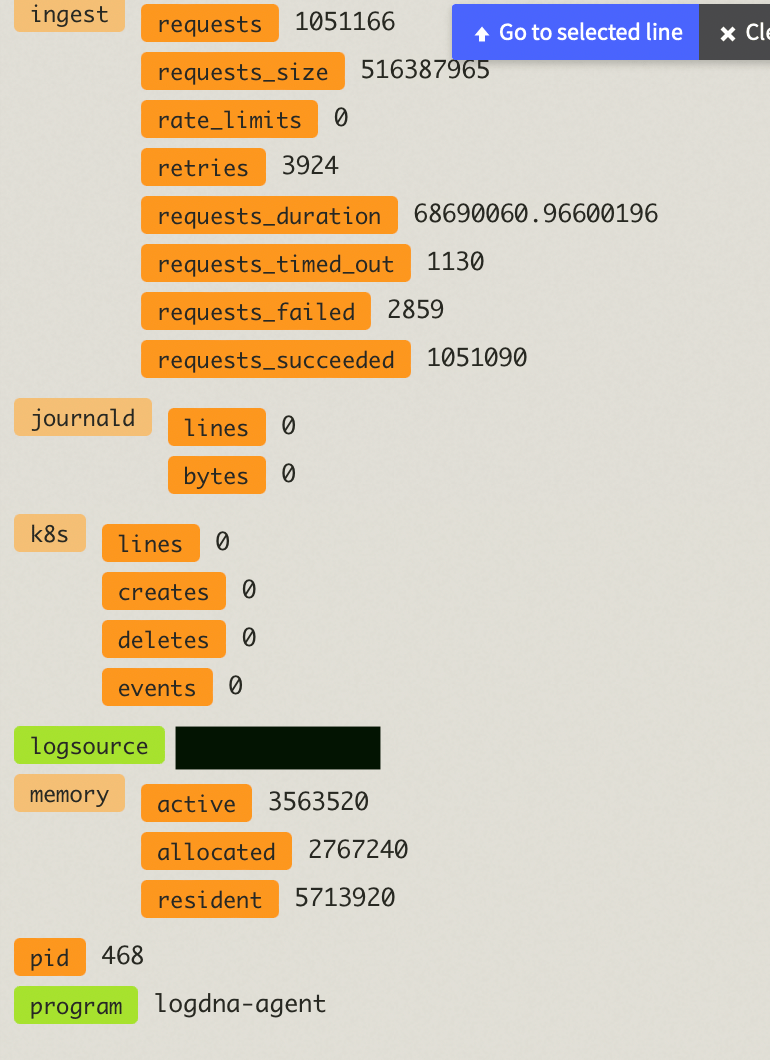 1. Enter `PID: {{pid}} | Program: {{program}} | Log Source: {{logsource}}` into Custom %LINE Template area.
2. You logs should now look like:
```bash theme={null}
Aug 8 11:29:03 samir-Debian-10 daemon.log PID: 468 | Program: logdna-agent | Log Source: ip-12-34-5-67
```
## Use Reserved Fields
[Reserved fields](/docs/log-parsing) are marked by an underscore.
If your data resembles:
```bash theme={null}
user 1234 requested endpoint /api/endpoint
```
And contains this field metadata:
```json theme={null}
{
meta: {
first_name: Jane,
last_name: Doe
}
}
```
Enter `{{_meta.first_name}} {{_meta.last_name}}, aka $@` into Custom %LINE Template area. Using `$@` will reference the original line.
This will display log messages in that view in this format:
```bash theme={null}
Jane Doe, aka user 1234 requested endpoint /api/endpoint
```
## Return as JSON
You can format your data to return as JSON.
```json theme={null}
{"index": {{query.index}}, "size": {{query.size}}, "ignore_unavailable": {{query.ignore_unavailable}}, "track_total_hits": {{query.track_total_hits}}, "body": {"query": {{query.body.query}}, "sort": {{query.body.sort}}, "aggs":{{query.body.aggs}}}}
```
### Formatted Log Line Example
```json theme={null}
Aug 8 12:49:20 xxxx-xxxx-xxxxxxxxx-xxxx apiinternal info {"index": ["*:logline.*"], "size": 0, "ignore_unavailable": true, "track_total_hits": true, "body": {"query": {
"bool": {
"must": [
{
"range": {
"_ts": {
"gte": 1659976890001,
"lte": 1659977360647
}
}
},
{
"bool": {
"should": [
{
"term": {
"_app": "localhost"
}
}
]
}
}
]
}
}, "sort": {
"_lid": {
"order": "desc"
}
}, "aggs":{
"metrics": {
"date_histogram": {
"field": "_ts",
"interval": "30s"
}
}
}}}
```
1. Enter `PID: {{pid}} | Program: {{program}} | Log Source: {{logsource}}` into Custom %LINE Template area.
2. You logs should now look like:
```bash theme={null}
Aug 8 11:29:03 samir-Debian-10 daemon.log PID: 468 | Program: logdna-agent | Log Source: ip-12-34-5-67
```
## Use Reserved Fields
[Reserved fields](/docs/log-parsing) are marked by an underscore.
If your data resembles:
```bash theme={null}
user 1234 requested endpoint /api/endpoint
```
And contains this field metadata:
```json theme={null}
{
meta: {
first_name: Jane,
last_name: Doe
}
}
```
Enter `{{_meta.first_name}} {{_meta.last_name}}, aka $@` into Custom %LINE Template area. Using `$@` will reference the original line.
This will display log messages in that view in this format:
```bash theme={null}
Jane Doe, aka user 1234 requested endpoint /api/endpoint
```
## Return as JSON
You can format your data to return as JSON.
```json theme={null}
{"index": {{query.index}}, "size": {{query.size}}, "ignore_unavailable": {{query.ignore_unavailable}}, "track_total_hits": {{query.track_total_hits}}, "body": {"query": {{query.body.query}}, "sort": {{query.body.sort}}, "aggs":{{query.body.aggs}}}}
```
### Formatted Log Line Example
```json theme={null}
Aug 8 12:49:20 xxxx-xxxx-xxxxxxxxx-xxxx apiinternal info {"index": ["*:logline.*"], "size": 0, "ignore_unavailable": true, "track_total_hits": true, "body": {"query": {
"bool": {
"must": [
{
"range": {
"_ts": {
"gte": 1659976890001,
"lte": 1659977360647
}
}
},
{
"bool": {
"should": [
{
"term": {
"_app": "localhost"
}
}
]
}
}
]
}
}, "sort": {
"_lid": {
"order": "desc"
}
}, "aggs":{
"metrics": {
"date_histogram": {
"field": "_ts",
"interval": "30s"
}
}
}}}
```